
Check Your Compatibility
Our products require you to have access to the paid or free software that facilitates the use of our products. As many photo-editing products have changed naming conventions over the years, it’s always helpful to be able to get an exact year or version number to be sure of compatibility before you purchase new editing resources.
Determining Compatibility
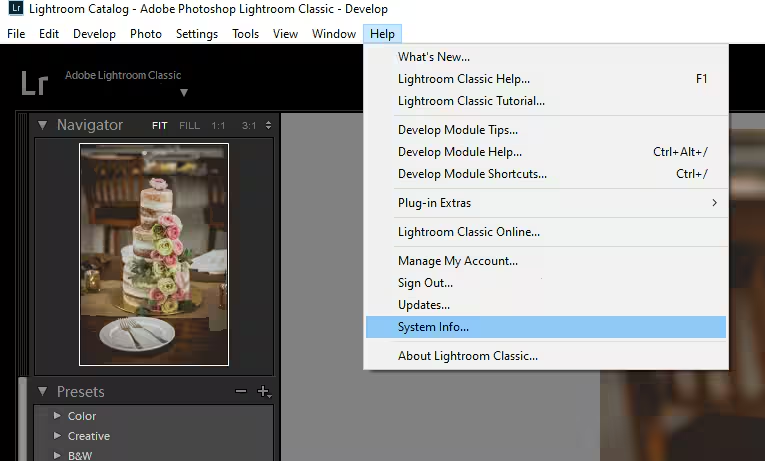
Want to know if you can use our products in your software, but confused about software information and version history? In your Adobe editing software you can typically navigate to Help > System Info… for exact version info!
Our products are fully compatible with the most recent Adobe Creative Cloud software – So, if you’re paying a monthly subscription you will have the largest selection of compatible products to choose from! We recommend keeping your software up-to-date via Help > Updates!
I edit on a desktop or laptop computer - which presets will work for me?
I have a subscription to Lightroom, Lightroom Classic, or Photoshop
Have an Adobe Creative Cloud Subscription to Lightroom (CC), Lightroom Classic, or Photoshop on your computer? All of our Lightroom Preset collections should work for you!
Minimum Version Requirements:
✔ Lightroom Classic v13+
✔ Lightroom (CC) v7+
✔ Photoshop (ACR) v14+
I purchased my Lightroom or Photoshop software outright
If you are using older Adobe software, or if you purchased a perpetual license for Lightroom or Photoshop outright prior to 2017, this software is no longer supported by Adobe. Thus, features and options are limited compared to the current Creative Cloud subscription iterations of the software.
We would recommend only purchasing older collections that we have listed as compatible with perpetual license software. These older collections were tested in earlier software and are offered in LRT and XMP format.
Earliest supported version for LR: Lightroom 5 (2013)
Earliest supported version for PS: CS6/ACR 9.1.1
I edit on an iPhone or iPad - which presets will work for me?
As of Lightroom Mobile 9.4.1 (7/22/2024), iPhone/iPad users can now import XMP presets directly in Lightroom Mobile!
Global (full image edit) presets and global (full image) tool presets will work in the Free & Premium Lightroom app on Android.
AI Adaptive & Effects presets require the Premium (Paid) version of the Lightroom Mobile app to function, as they rely on Masking.
AI & Effects presets will only function on capable modern devices with up-to-date OS.
Earliest devices: iPhone 11, iPad 10th Gen, Air 4th Gen, Pro 10th Gen (and all later models).
XMP Presets can be imported whole .zip in Lightroom mobile.
I edit on an Android phone, tablet, or Chromebook- which presets will work for me?
All of our preset collections include XMP format presets, compatible with direct import into Lightroom Mobile on Android (phone, tablet, and Chromebook).
Global (full image edit) presets and global (full image) tool presets will work in the Free & Premium Lightroom app on Android.
AI Adaptive & Effects presets require the Premium (Paid) version of the Lightroom Mobile app to function, as they rely on Masking.
XMP Presets can be imported whole .zip in Lightroom mobile on Android.
Photoshop Actions
Works in the current Creative Cloud Subscription Photoshop software
Earliest compatible version: Photoshop CS6
.ATN Format
Desktop ONLY
Elements Actions
Works in current versions of Elements
Earliest Compatible Version: Elements 2015
AI & 2.0 Actions
Works in current Creative Cloud Subscription Photoshop Software.
Overlays for Desktop
Offered in JPG and/or PNG image format
Overlays for Mobile
Offered in JPG and/or PNG image format
LUTs for Video
Will work in any video software or mobile app that supports, .CUBE format LUTs
LUTs for Still Images
Will work in any editing software that supports, .CUBE format LUTs